
티스토리 뷰
1. use requestAnimationFrame for visual changes than setTimeout or setInterval
1-1. How to animate
브라우저는 보통 60FPS를 지원한다. 즉 1초에 60개의 frame을 찍어낼 수 있는데 이는 약 16ms(1000/60) 안에 하나의 frame을 찍어내야 한다는 말이다. 만약 하나의 frame을 찍는데 16ms가 넘어가게되면 그 다음 frame이 drop되고 FPS가 낮아져 사용자는 화면이 끊겨보인다고 느끼게된다.
애니메이션을 구현할 떄 주로 css의 transform이나 translate 등을 사용하지만 보다 복잡한 구현의 경우에는 JS를 사용하기도 한다. 이 경우에 사용할 수 있는 방법으로 두 가지가 있는데
1. setTimeout(or setInterval)을 통해 시간 주기로 화면을 변경
2. requestAnimationFrame을 통해 frame 생성 주기에 맞춰 화면을 변경
결론부터 말하자만 requestAnimationFrame을 사용하는 것이 좋다.
1-2. why requestAnimationFrame?
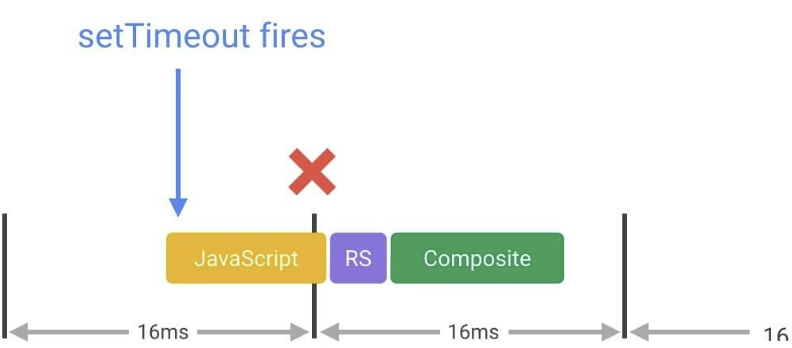
setTimeout은 frame 생성과 상관없이 주기적으로 동작하기 떄문에 frame 시작 시간이 아닌 중간이나 끝에 trigger될 수 있으며 이는 frame을 잃게될 가능성이 높아진다. 반면에 requestAnimationFrme은 다음 repaint 전에 callback을 실행하기 때문에 frame 주기에 맞춰 실행된다. 이는 frame drop의 가능성을 낮춰주며, 모니터의 주사율(Hz)에 따라 다르게 동작할 수 있게한다. 또한 페이지가 비활성 상태일 때 그리기가 중단됨으로 callback이 실행되지 않아 resource를 절약할 수 있다(setInterval은 관계 없이 동작).
<setInterval로 했을 때>
function playAnimationWithInterval() {
  const box = document.querySelector('#box');

  const transformStyle = box.style.transform;
  const translateX = transformStyle.replace(/[^\d.]/g, '');
  box.style.transform = `translateX(${+translateX + 2}px)`;

  spendTime();
}

setInterval(() => {
  playAnimationWithInterval();
}, 16);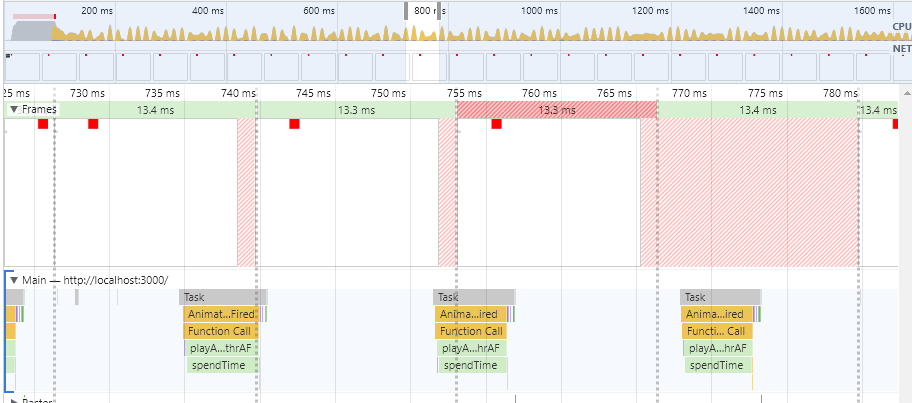
<requestAnimationFrame으로 했을 때>
function playAnimationWithrAF() {
  const box = document.querySelector('#box');

  const transformStyle = box.style.transform;
  const translateX = transformStyle.replace(/[^\d.]/g, '');
  box.style.transform = `translateX(${+translateX + 2}px)`;

  spendTime();

  window.requestAnimationFrame(playAnimationWithrAF);
}

window.requestAnimationFrame(playAnimationWithrAF)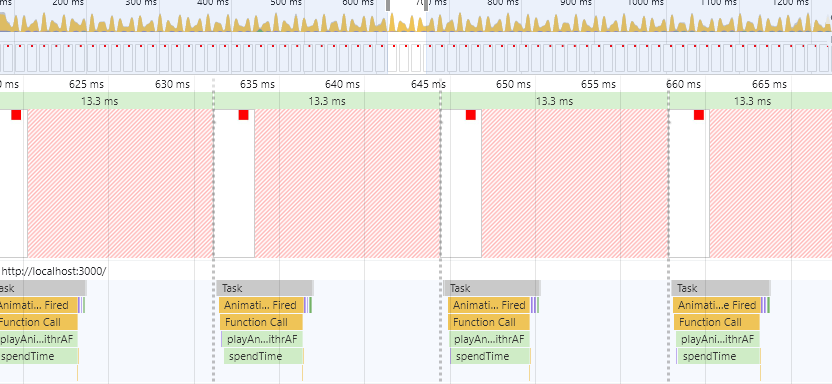
2. Reduce complexity or use Web Workers
requestAnimationFrame을 사용함으로써 보다 안정적으로 frame을 생성할 수 있게 되었지만 callback에서 처리할 내용이 많아 시간이 (16ms보다)오래 걸리면 FPS가 낮아질 수 밖에 없다. js는 single thread 언어이기 때문에 js execution, layout, paint가 동일한 thread에서 진행되기 때문이다. 이를 위해 js의 실행 시간에 대해 신경을 써야한다.
일반적으로 scroll과 같은 animation callback은 3~4ms 안에 실행되어야 하고, animation이 아닌 경우에는 더 오래 걸려도 괜찮지만 앞에 말했듯 js execution은 rendering을 막기 때문에 오래 걸리는 실행에 대한 처리가 필요하다.
2-1. Web worker
첫 번째로, DOM을 건드리지 않는 실행이라면 web worker에게 위임할 수 있다. web worker는 별도의 thread로 돌기 떄문에 rendering에 영향을 주지 않고, worker의 job이 끝나면 결과만 사용해서 화면을 변경해주면 된다.
2-2. Reduce complexity
두 번째로, DOM을 건드리는 작업의 경우(반드시 main thread에서 실행되어야 하는 것들)에는 batching approach를 고려할 수 있다. 큰 task를 작은 여러개의 (수 ms가 걸리는)micro task로 쪼개어 requestAnimationFrame으로 실행하는 것이다. 이렇게 하면 계속 main thread를 잡고 있지 않아 화면 render 및 사용자 interface가 block되지 않으며 progress 등으로 전체 task에 대한 진척도를 사용자에게 제공할 수 있다.
'JavaScript' 카테고리의 다른 글
| Lazy loading (Intersection observer vs scroll event) (0) | 2022.12.27 |
|---|---|
| Date (0) | 2022.09.21 |
| Regular function vs arrow function (0) | 2022.08.01 |
| var, let, const (0) | 2022.08.01 |
| Execution context, scope chain (0) | 2022.08.01 |